
Choose a 3D printer by what you want to make and where it can operate. Practical household parts, multicolor decorations and detailed resin miniatures require different equipment and workspaces. These four scenarios explain the learning, material and handling tradeoffs before offering good, better and best examples.
Choose the process before the printer
Filament printers, often called FDM or FFF, build objects from heated plastic. They are a practical starting point for organizers, prototypes, brackets and decorative models. Resin printers cure liquid photopolymer with light and can reproduce fine miniature detail, but introduce additional handling, washing, curing and waste-management requirements.
Start with an actual object and check its dimensions. Build volume is only the printable space, not the full desk footprint. Allow room for the spool or material feeder, moving bed, door, tools and maintenance. A larger machine is useful only if the objects cannot be split or printed on a smaller one.
Match material, nozzle and enclosure to the job
PLA is a common learning material; PETG may suit some practical objects. Material suitability depends on the part’s heat exposure, loads and environment. An impressive nozzle temperature alone does not establish that a printer can reliably handle every engineering filament. Follow the exact manufacturer’s material and drying guidance.
Filled filaments can require abrasion-resistant hardware. Flexible materials may not work through an automatic feeder even when the printer itself supports them. A heated chamber and an enclosure perform different jobs. Neither removes the need to consider emissions, ventilation and the instructions for the particular material.
Understand what multicolor adds
An automatic material feeder can change colors within a print, but it may produce substantial purge waste and take considerably longer than a single-color object. Check how many colors the included hardware actually supports. A printer advertised as multicolor-ready may require a feeder that is sold separately.
More elaborate machines can justify their cost when the same workflow will be repeated often. For a few decorative models, painting or printing separate colored pieces may be simpler. Include filament storage, dryers where needed and replacement nozzles or build surfaces in the ownership decision.
Prepare the workspace, especially for resin
NIOSH guidance explains that 3D printing can release particles and gases. A closed cover or built-in filter is not a guarantee that exposure is controlled. Use a suitable workspace with appropriate ventilation and follow the printer, material and safety-data-sheet instructions. Keep hot machinery, uncured resin and cleaning chemicals away from children and pets.
Resin work needs compatible chemical-resistant gloves and eye protection as directed by the safety data sheet, a protected work surface and a plan for washing, curing and disposing of contaminated materials. Avoid skin contact and do not pour uncured resin or contaminated wash liquid down a drain. Check local waste rules. A wash-and-cure station is an additional purchase unless explicitly included.
Look at software, support and maintenance
Automatic calibration reduces setup work but does not eliminate failed prints. Learn the slicer, bed preparation and first-layer checks before leaving a machine to run for a long job. Rated movement speed is not a promise that every object prints at that speed or reaches the same strength and finish.
Check spare parts, repair instructions, firmware requirements and whether the desired workflow can run locally or requires an online account. Read the current recall information for the exact model. Choose a supported machine whose ongoing maintenance fits the time you want to spend on the hobby.
First filament printer: learn with small, manageable projects
Good favors a compact ready-to-use machine, better expands the printable area, and best provides an enclosed alternative. Begin with a well-understood material and a suitable ventilated workspace. An enclosure can help the process but does not make a printer a child’s unsupervised toy.
Good
FLASHFORGE Adventurer 5M
Open-frame CoreXY · 220 × 220 × 220mm build volume

The Adventurer 5M is a useful first filament printer when the aim is to learn with modest household objects and decorative models. Automatic leveling and a CoreXY motion layout reduce some setup friction, while the open frame keeps the mechanism visible and accessible. That openness also leaves hot and moving parts exposed. Allow enough workspace around it, follow material and ventilation guidance, and treat the advertised maximum movement speed as a limit rather than a typical finished-print rate.
Check current price on AmazonPaid link may earn commission.
Better
ELEGOO Centauri Carbon
Enclosed CoreXY · 256 × 256 × 256mm build volume

Centauri Carbon is a step up for someone who wants a larger enclosed print space than the open beginner example. The selected model is the original Centauri Carbon with a built-in camera, not Centauri Carbon 2 or a color-feeder package. Its automatic calibration is convenient, but learning the slicer and checking first layers remain part of ownership. An enclosure does not guarantee emissions control or compatibility with every demanding filament; check the exact material guidance before starting.
Check current price on AmazonPaid link may earn commission.
Best
FLASHFORGE Adventurer 5M Pro
Enclosed CoreXY · quick-change nozzle · 220mm build volume

The Adventurer 5M Pro is the premium beginner example for someone who prefers an enclosed machine and its more complete airflow and monitoring package. It is a feature upgrade rather than a larger build-volume upgrade: its printable cube is smaller than the Centauri Carbon’s. A quick-change nozzle can make maintenance more approachable, but compatible replacements still matter. Follow ventilation and material instructions; built-in filtration is not a reason to operate the printer in an unsuitable living or sleeping space.
Check current price on AmazonPaid link may earn commission.
Useful larger parts: more room and material flexibility
These examples move from a compact enclosed model to actively heated larger Creality designs. Choose the build volume for real objects, and check material requirements before choosing the fastest headline specification. The selected K2 Pro is the printer-only version; the K2 Plus example includes its color feeder.
Good
Creality K1C
Enclosed CoreXY · single-material printer

The K1C is a useful starting point for functional filament parts when an enclosed machine and abrasion-resistant extrusion hardware are relevant. It can suit someone progressing beyond basic decorative PLA projects, provided the exact filament and drying requirements are followed. This is the K1C listing, not a guaranteed 2025 refresh or a multicolor bundle. Do not infer a heated chamber from the enclosure or assume that carbon-filled filament alone makes a part suitable for a safety-critical job.
Check current price on AmazonPaid link may earn commission.
Better
Creality K2 Pro
Printer only · active chamber heating · 300mm build cube

The K2 Pro adds a larger build area and active chamber heating for a more ambitious functional-parts workflow. It makes sense when the planned objects or chosen materials justify the additional machine size and ownership effort. This selected offer is the printer-only version; a CFS material feeder is not included just because the printer supports multicolor expansion. Confirm material profiles, workspace needs and drying requirements rather than choosing from nozzle temperature or speed alone.
Check current price on AmazonPaid link may earn commission.
Best
Creality K2 Plus Combo
350mm build cube · active chamber heating · CFS included

The K2 Plus Combo is the premium example for larger functional projects and a workflow that will use the included CFS material feeder. Its build volume can reduce the need to split some sizeable objects into separate pieces. The tradeoffs are a much larger installation, more material committed to long prints and additional feeder maintenance. Check actual desk strength and clearance, and remember that multicolor capability introduces purge waste and does not make every flexible or specialty filament feeder-compatible.
Check current price on AmazonPaid link may earn commission.
Multicolor projects: decorative models and a growing hobby
Good offers an accessible enclosed color-printing setup, better pairs Bambu’s established P1S with AMS, and best moves to the newer P2S with AMS 2 Pro. Compare complete packages, waste and workflow rather than expecting multicolor capability from the bare printer alone.
Good
Anycubic Kobra S1 Combo
Enclosed CoreXY · four-color feeder with active drying
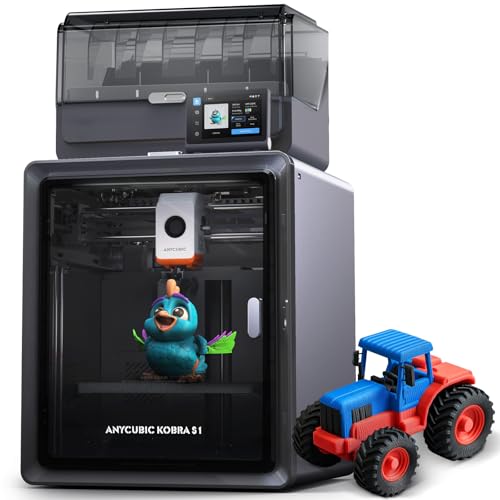
The Kobra S1 Combo is an accessible example for someone who wants enclosed multicolor printing as a complete starting package. The selected offer includes the material-handling system with active drying, rather than the bare S1 printer or the newer S1 Max. Compare the exact feeder generation and package contents before ordering. Four-color printing can take longer and produce more waste than a one-color model; the extra hardware should solve a project need rather than simply add colors to the specification.
Check current price on AmazonPaid link may earn commission.
Better
Bambu Lab P1S Combo
Enclosed CoreXY · AMS included

The P1S Combo pairs Bambu’s enclosed printer with its AMS material system for someone planning regular multicolor projects. It is the established P1S package, not the newer P2S or a standalone feeder. The ecosystem and included material handling are the main reasons to compare this tier with a simpler machine. Check current software and account requirements, supported feeder materials and drying needs. Automatic color changes still create purge waste and do not remove the need to maintain the printer.
Check current price on AmazonPaid link may earn commission.
Best
Bambu Lab P2S Combo
Enclosed CoreXY · AMS 2 Pro included

The P2S Combo is the premium color-printing example for someone choosing the newer P-series design and AMS 2 Pro package. Its updated interface and error-monitoring features can be useful in a regular hobby workflow, but they do not guarantee every print will finish correctly. Verify that the exact offer includes AMS 2 Pro, as selected here, and check which drying functions require additional power accessories. Compare current firmware policies and parts support before committing to a long-term printer ecosystem.
Check current price on AmazonPaid link may earn commission.
Detailed miniatures: resin printing with a proper workspace
Good fits smaller batches, better provides a larger resin build area, and best adds the newer high-resolution heated-tank design. These are printer offers rather than complete resin workstations. Make the handling, ventilation, washing and curing plan before choosing a screen resolution.
Good
ELEGOO Mars 5 Ultra
Compact resin printer · 7-inch 9K LCD

The Mars 5 Ultra is a suitable small-format example for detailed miniatures when a proper resin workspace is already planned. Its compact build area makes sense for smaller batches rather than large one-piece props. The 9K label describes the screen pixel grid, not a universal promise of finished-model quality. Resin choice, orientation and exposure settings still matter. This is a printer offer, so budget separately for suitable protective equipment, ventilation, washing, curing and responsible waste handling.
Check current price on AmazonPaid link may earn commission.
Better
ELEGOO Saturn 4 Ultra 12K
Larger resin build area · 10-inch 12K LCD

The Saturn 4 Ultra 12K is a step up when larger models or more miniatures in one batch justify a bigger resin machine. It offers a more spacious build area than the Mars example, but also uses more workspace and can put more resin at risk during a failed job. This selected model is the 12K version, not the newer 16K heated-tank variant. Plan washing and curing equipment for the actual model size, not only the printer’s headline resolution.
Check current price on AmazonPaid link may earn commission.
Best
ELEGOO Saturn 4 Ultra 16K
Premium resin example · heated tank · 10-inch 16K LCD

The Saturn 4 Ultra 16K is the premium resin example for someone who will use its heated-tank design and newer high-resolution screen. It is a different version from the Saturn 4 Ultra 12K, with its own dimensions and operating details. A higher pixel count alone does not establish a better result for every miniature. The selected offer does not include a wash-and-cure station; ventilation, compatible gloves and handling procedures remain necessary alongside the printer’s automated features.
Check current price on AmazonPaid link may earn commission.
Choose the process and workspace first, then the smallest supported machine that can make the intended objects. Check the exact bundle, material compatibility and current safety instructions. Good Buy Daily’s examples are starting points for comparing equipment; successful printing also requires learning, maintenance and appropriate handling.